A sales operations colleague leaves the company on Friday. Their Salesforce login must be blocked at the agreed departure time, but they also own customer records and receive a weekly pipeline email. Treat access removal and business handoff as two tracked outcomes: completing one does not prove the other is finished.
This fictional example offboards Morgan, an ordinary internal user. An authorized admin performs the changes; the exercise does not require Morgan’s password. Rehearse the handoff in a sandbox using a test user and synthetic records before adopting it as your production checklist.
1. Establish the departure scope
Record the exact username, user ID, departure time with time zone, approving manager, replacement owner, and ticket number. Distinguish a person’s account from a shared integration identity. Inventory Morgan’s open work, approval responsibilities, dashboard/report dependencies, notification recipients, and any automation that references the user.
Create a short handoff table in the ticket with columns for dependency, current setting, replacement, test evidence, and owner. For this example, the rows are a default lead owner setting, twelve customer Accounts, and a weekly pipeline subscription. These are sample dependencies to discover, not a claim that every user has them.
2. Freeze login while the handoff is pending
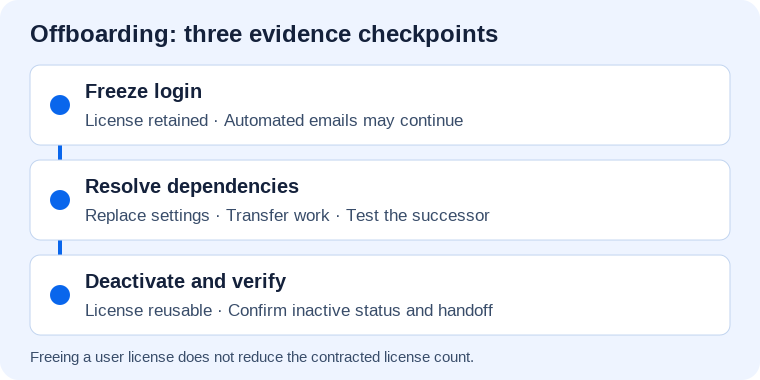
At the authorized time, open Setup → Users → Users, select the correct username, and click Freeze. Salesforce documents Freeze Users or Manage Users as the required permission. Freezing prevents login while you resolve dependencies that may block deactivation. It retains the license allocation; it is an interim state rather than the end of offboarding.
Capture the result in the ticket and keep a separate administrator account available. Do not test by asking the former employee to sign in. Coordinate identity-provider and connected-system access removal with the responsible teams under your organization’s offboarding process. Do not assume this one Salesforce button completes those systems’ access reviews.
3. Replace dependencies and prove the handoff
- Resolve the actual blocker. If saving the inactive user reports a dependency, record its exact message. For Morgan’s example, replace the default lead owner with the approved active successor, then test the relevant lead intake route with a synthetic lead. Other possible blockers include default workflow/case ownership and custom hierarchy references. Inspect the named setting rather than removing unrelated configuration.
- Transfer customer work deliberately. List Morgan’s twelve Accounts and agree on their new owner. Use the Account ownership-transfer pilot to check related-record and sharing effects before the full transfer. Confirm that the successor can open a sample Account and carry out the expected work.
- Review recipients and reporting identities. Find the pipeline subscription, inspect its recipients and running-user behavior, and replace it with an approved arrangement. The safe report-subscription guide explains how to test the resulting data visibility. Check dashboard ownership/running-user dependencies separately.
- Reassign approvals. Identify where Morgan is an approver and arrange an active replacement. Ask the process owner to validate both the configuration and outstanding work; a changed record owner alone is insufficient evidence that approval responsibilities moved.
Do not leave a frozen user on the assumption that messages have stopped. Salesforce explicitly documents that automated emails, including alerts and scheduled reports, can continue for frozen users. Review notification settings and recipients during an extended freeze and record the outcome.
4. Deactivate and close with evidence
With the dependencies resolved, an admin with Manage Internal Users opens the Users list, clicks Edit beside Morgan, clears Active, and saves. Confirm the account is inactive. Deactivation preserves historical records and makes the user license available for reuse; it does not automatically transfer all owned records.
Close the ticket only when the access result and each handoff row have evidence. For the example: the user is inactive, the intake test reaches the new lead owner, twelve Accounts have the approved owner, the successor passes the access check, and the subscription has the intended recipients. Record a follow-up owner for anything that cannot yet be verified.
Limits and common mistakes
- Available licenses are not billing reductions. Salesforce states that deactivation does not reduce the contracted license count.
- Memberships and permissions need review. Inactive users can retain permission-set assignments. Include cleanup in the handoff rather than assuming inactivity removes every assignment.
- Special identities need a separate plan. This checklist targets a normal internal person account. Check Salesforce’s considerations and service dependencies before changing system or integration identities.
- Reactivation is another access change. If authorized later, review the account’s current permissions and business dependencies before restoring access. Keep the departure evidence so the next admin understands what changed.
Official Salesforce references
Technical references checked November 22, 2026. The staged example and acceptance checks above are an operational checklist, not a claim of a completed org test.